Click here to watch the video on the Webstream Dynamics Youtube Channel.
Tuesday, September 21, 2010
Maximizing Your Store's Website Exposure on Google
Since a lot of stores I work with still don't grasp how to achieve better website exposure in Google's search results I put together a video from a PowerPoint Presentation I did for a retailer seminar. Feel free to email me if you have any further questions or need some help. (At the end of the video I give an example of a local business that has 3 separate links to their website on the same search results page.)
Click here to watch the video on the Webstream Dynamics Youtube Channel.
Click here to watch the video on the Webstream Dynamics Youtube Channel.


Sunday, September 19, 2010
Is Walmart Selling Flooring Now?
Well yes and no. If you do a search on Google for "hardwood flooring", "laminate flooring" or "vinyl flooring" you might see Walmart listed in the search result listings. See the image below...
 So are the flooring manufacturers actually selling Walmart direct? No, not yet, but they are selling a 3rd party dot.com who is affiliated with Walmart and doing the actually selling of the flooring. See screen shot below...
The dot.com is CSNStores.com and they are one of the largest and most successful e-retailers today. From what I can tell they have no real brick-and-mortar stores, just 200+ websites selling all kinds of different products, including flooring.
They have their own flooring e-commerce website too...

 |
| Click on the image for a little larger view |
 |
| Click on the image for a little larger view |
They have their own flooring e-commerce website too...
 |
| Click on the image for a little larger view |
Here are some of the flooring brands they say they offer online...
 |
| Click on the image for a little larger view |
So how do smart flooring retailers market against Walmart and CSN Stores? Pretty easy... sell your local services, installation expertise, product expertise and all the things that make your customers want to buy from you. The Internet is a price driven medium, but flooring is about much more than price. We know consumers don't understand flooring , they don't know brands and they don't understand installation. So market your flooring specialty store, not just the brands you carry and tell local shoppers why buying from you is a better choice. Make sure your website and web marketing initiatives talk about you and the great services you provide for your customers.
Saturday, September 18, 2010
How To Claim Your Google Local Business Listing in Google Places
Let me start by saying, many small businesses still have not claimed their Google Local Business Listing and I am sure most store owners reading this don't even know what I am talking about. Just so you know, what I am referring to is not a gimmick, not spam, and costs store owners nothing. That's right, it is free from Google.
When you do a search for specific types of local products or services on Google you should see a list of local businesses along with a Google Map. It looks something like this...
In the above example, you can see some local plumbers listed for Sheboygan, Wisconsin bacause I did a search for Sheboygan plumbers. I could have done a search for Milwaukee carpet stores and I would see a list of local carpet stores around Milwaukee. You can do the same thing for any city or town and type of business. That is how many consumers are searching for local businesses to fulfill their needs today.
These businesses are pulled by Google from a variety of different places, such as the SuperPages. Each of these listings can be edited by the actual business owner. To do this the business owner must claim and verify to Google that the business listing is their actual business. If you click on the line that says "Local business results for...." you will go to a Google Maps page that will look similar to this...
For store owners who have never claimed their Google business listing before, you should first find your business listing in the Google Maps and click on "More info >" underneath the business name. This will take you to Google Maps actual business details page. If you have never claimed your business listing before the page details will look pretty basic, with a lot of details missing. The listing below is an example of a local business who has previously claimed and edited their Google local business listing. It includes their website address, email address, store hours, a short business description, business categories and more.

When you do a search for specific types of local products or services on Google you should see a list of local businesses along with a Google Map. It looks something like this...
 |
| A typical local Business Listings in the Google Search Results |
These businesses are pulled by Google from a variety of different places, such as the SuperPages. Each of these listings can be edited by the actual business owner. To do this the business owner must claim and verify to Google that the business listing is their actual business. If you click on the line that says "Local business results for...." you will go to a Google Maps page that will look similar to this...
 |
| Google Maps business listings |
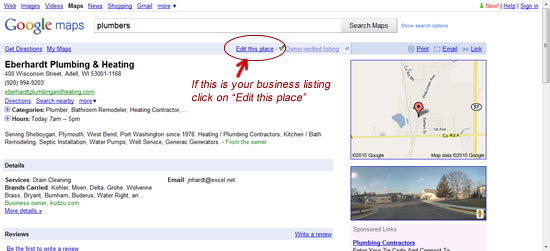 |
| A Local Business Lsiting in Google Maps |
Once you have found your Google business listing, if you are the actual owner and want to claim and edit the listing then you would click on Edit this page, as shown above. This will take you to a Google login screen where you will enter your Google Account email address and password, which will look something like below. (If you have not already created a free Google Account see: How To Create A Google Account.)

You can also skip all the above and go directly to Google's Local Business Center to login using your Google Account and claim your business listing. See: http://www.google.com/local/add/businessCenter
Okay, now that you have successfully logged in you can edit your business details. The Google Local Business Listings are referred to by Google as Google Places. Watch the video below to learn how to manage your Google Places' business information. (Warning: This is a rather long video, if you want to save time jump right to the 10 minute mark in the video to get into editing your business listing.)
How Does Google Verify The Listing I Edit Is Really My Business?
When you have finished editing your Business Listing and click the Submit changes button Google will give you two options for verification.
If you want Google will call your business phone number you have listed immediately and an automated voice will give you a 5 digit number. This is while you are still on the Google business listing website. You will then immediately type in the 5 digit number in the appropriate textbox and click the submit button for instant verification.
The other option is Google will mail you a post card with the 5 digit number. This can take up to two weeks. You will then go back online and log into your Google business listing, using your Google Account and type in the 5 digit number from the post card.
After your business is verified by Google they will update your business listing with the changes you made to your listing in about 24 hours.
I will cover more things businesses can do in Google Places in the future. Right now, it is important you at least follow Google's instructions and claim your local business listing
Friday, September 17, 2010
How to Create a Google Account?

You will need a current working email address. The password you create should include at least one punctuation mark and/or number and use both uppercase and lowercase letters. This will prevent others from hacking into your Google Account. Lastly, be sure you write down your Google Account password and the email address you used with it. Don't loose it! :)
Monday, September 13, 2010
How to Generate More Targeted Local Traffic
Here are 5 basic ways to generate more local, targeted website traffic for stores and other local businesses:
- Make sure your web pages contain quality text content that clearly talked about your products and services and describes what cities and towns you service . Use keyword phrases that your target audience commonly use when searching for your type products and services. Describe accurately each web page in your title tags, meta description tags. (For more inforamtion about Title Tags and the Meta Description see: Understanding the Importances of Title Tags and Meta Description Tags. ) Also, all internal text links, such as in menus, should clearly describe to visitors what to expect if they click on a link. Use Flash and graphics wisely, since they tend to do poorly with the search engine rankings. Avoid using duplicate content that is used in other websites. The search engines usually filter it out, so it doesn't help your search engine rankings.
- Get as many incoming links from other relevant websites. Incoming links with well written text can dramatically improve your targeted traffic, both from users clicking on those links, as well as improve your "link popularity" with the search engines. (Think of incoming links from other "quality" websites as votes for your website. The more "quality" votes you have than your competitors the higher you will be placed on Google's search results organic listings.)
- Advertise on the search engines and other portal websites that your targeted audience frequents. The key to pay-per-click advertising (called PPC) is to have a good understanding of how pay-per click advertising works, finding and bidding on high converting targeted keyword phrases and generating relevant text ads that inspire searchers to click on your ad. Lastly, don’t do paid advertising if you are not going to track and measure your results.
- Add your website address to all your off-line advertising campaigns. It is amazing to see how many consumers go to the web after they see a company’s TV ad, newspaper ad or hear them on the radio. This is also true for direct mail and catalogs as well.
- Create an addtional page for each town or city you service, include the product and services you offer. Plus add a call to action to each of these pages. If the towns or cities you service are not ever listed in your website's text content then your website won't be listed in the results when consumers do a local search.
- Finally, do this website test. Print out all of the pages you consider are targeted content pages. With a highlighter pen highlight the product and services keywords on each page. Then also highlight the city and town keywords you service. Check to see what is missng. More on content in later blog posts.
Subscribe to:
Posts (Atom)