Tuesday, May 10, 2011

Is My Online Advertising Campaign Really Working?

A lot of stores are considering if they should do some advertising on the various online yellowpage type directories, such as YP.com, Yelp, Yellowbook, etc. I often hear storeowners tell me that have a campaign already setup with a major local business directory they have no clue if they are getting their monies worth for the bucks they are spending.

Before you start any online, store advertising campaign you need to be able to view how people are getting to your website. The easy way to determine where your website visitors are coming from is by using Google Analytics (it's free) on your website. This will help you track where your website audience is actually coming including any advertising campaign you decide to try. See a simple example below...
Click image to enlarge
Notice the yellowpages.com source. What this is showing you is over a selected time period how many website visitors came from Yellowpages.com. I also added the region so you can also see where the website visitors came from. If you were a store in Massachusetts you would see that 5 visitors came from Massachusetts to your website from Yellowpages.com. Depending on the time period and advertising costs you can now better decide if it is worth it.

One thing to note: The bottom line is getting web visitors to your store (converting visitors to buyers). So if those 5 Yellowpage.com web visitors all became new customers you might find this advertising program is a great deal. It's about the quality of the leads, not just quantity.

Sunday, May 1, 2011

Using Google Trends To Look At The Flooring Industry

Now that we have completed one third of 2011 I thought I would look at the trends in certain flooring industry categories again to see how things look compared to previous years. Although some things seem pretty obvious I wanted to confirm my suspicions based on conversations I had with many different flooring customers.

I like to use Google Trends because it gives us a pretty accurate picture based on searches done on Google. I will start with a couple of trend tests to demonstrate Google Trends is fairly accurate and believable. First one is based on a recent fad which is women putting feathers in their hair. This really took off late 2010 and is going crazy in salons right now across the USA. (I know this because I have a client who sells a boat load of feathers each month.) So let's see how it looks using Google Trends..

Click to enlarge
The second test is the "Super Bowl", which should peek for a very short time span and does...

Click to enlarge
We can see the Google Trends are fairly accurate. So lets see how Walmart and Amazon are doing over time. Notice the high peeks every year during the holiday shopping season.
Click to enlarge
So now lets look at some search trends for specific flooring categories from 2004 to present and only for the USA.
1. Carpet..


2. Hardwood flooring...

Click to enlarge
3. Laminate flooring...

Click to enlarge

4. Flooring...

Click to enlarge
I heard from many store owners that 2010 started out fairly strong and then died the second half of 2010. The Google search trends for 2010 seems to pain the same picture.

5. Shaw Carpet, Mohawk Carpet and STAINMASTER

Click to enlarge
6. Compare "Carpet One", Flooring America" "Mohawk Flooring" and "Shaw Flooring"..

Click to enlarge
7. SmartStrand (Notice the huge spike in searches during zoo animal promotions

Click to enlarge
Google Trends seems to say the amount of interest and noise being made online about flooring is steadily declining. If we looked at from State to State I am sure we would see some area trends doing much better than others.

Saturday, April 16, 2011

Does Google Places Drive Website Traffic?

On Mike Blumenthals blog he recently posted a local SEO survey conducted by Brightlocal.com in which they reported that 59% of consumers use Google each month to find a local businesses. Although I don't doubt that, I found this a little harder to swallow... "Local SEOs reported that Google Places was the number one source of traffic and Google organic was number two". This part of the survey really interigued me, but I wasn't convinced that statement was accurate. Especially interviewing SEOs that could be just throwing out numbers without real data to back it. I know us SEOs and web designers aren't in the same category as politicians, but some I feel are pretty close. :)

Since our April showers today turned into a blowing, wet snowstorm, I decided to stay indoors and do some data digging rather than going outside and doing some honey-do projects. At least I can tell her I am working, right?

I decided to look at the actual log stats and examine the referring URLS that all originated from Google. To keep this simple and fast I used 2 different retail websites in different cities in the USA. One has just one store location while the other website has 2 store locations. Both have claimed their Google Places listings and updated the information. Also, neither website has ever used Google Tags or Google Boost/Adwords. I then looked at the stats for the past 30 days and removed any referrers that were not from Google. This left me with just referring links that came from Google, but not always Google in the USA.

Store #1
Store #1 - clikc for full view
Store #2
Store #2 - Click for full view
The first thing that caught my attention was that so few clicks to the client's website actually came for their Google Place's page. It appears the majority of Google Local clicks to the business's website is actually coming from Google organic search results which includes Google Places listings (ie: 7-Pack). What makes me think this is true is the number of clicks to website Google Places's dashboard stats reports versus how many referring URLS include http://maps.google.com/maps/place.
Note: I haven't conducted a big enough sampling to determine if this is true, but from the above it seems to have some real merit.

Also, others things to notice... the purple colored referring URLS I discarded based on the search location doesn't seem to be relevant to the client's location, or the search doesn't appear to be location in nature. As example, some Google searches were from other countries and others are from Google image searches. So in both cases about 10% of the Google searches I felt were not relevant to the stores.

In both store cases there were aproximately 82% of the searches from google.com/search or google.com/url. I refer to those as Google blended search results based on comments made by Mike Blumenthal on this blog.  Without further examination I have assuming Google blended is coming from Google's search engine listings that include both Google organic and Google Places' listings. Further evidence that makes me think this is,  for each business Google Places stated 30-50+ users clicked and went to the business's website in the past 30 days, but the referring URLs  don't show from http://maps.google.com/maps/place, except for 1 user. So where did the rest of the users come from? That leads me to assume all but one came from the Google's search engine normal listing pages.

Also, this is Google's Mobile search window - http://www.google.com/m Any referrers with that URL were from someone doing a mobile search. This is interesting too.. http://www.google.com/m/local?site=local

Tuesday, April 12, 2011

How to claim and update your business listing in Google Places

Google Places is the name for Google's local business directory. You will sometimes see local businesses listed in Google search results and when you click on Google Maps, or Google Places. Every brick-and-mortar small business should take the time to claim and update their listing in Google Places. So how does a small business claim their business listing and update the information?

Before starting it is best to be prepared with all the business details, including business name, address, phone, business hours, website address, contact's email address, a short business description, product categories, services offered, and major brands. Also, gather up 5- 10 digital photos that will help promote your products and services to online shoppers. Plus, any online YouTube videos you may have too. I use Microsoft's Notepad and insert all the text details before beginning. Planning ahead will save time from having to scramble around the office looking for the details and timing out on the web page.

 Be sure you have an existing Google Account. There are two ways to claim a business listing

One way is to start here at Google Places: http://places.google.com/business. This is best if you need to add a new business listing that doesn't exist in Google Places, or you want to edit a business listing that you have previously claimed. Just log in with your Google Account.
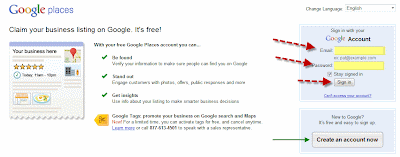
Click image for full view
After logging in this will get you to your existing business listing or help you select and claim a business listing.

If you do not have a Google Account, click on the button that says "Create an account now". By the way, creating a Google Account it is FREE and very simple. You can use your existing email account (you do not need to create a Google Gmail account) and be sure the password you create you write down some where so you don't forget it. Here is a screenshot for creating a new Google Account:
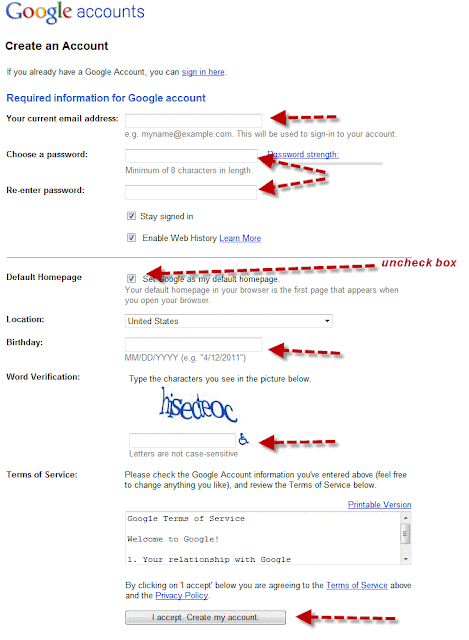
Click image for full view
Pretty simple right?

The second way to claim your existing Google business listing is to first do a search for it on Google and then click on its Google Place listing. You should then see a business listing something like this one:
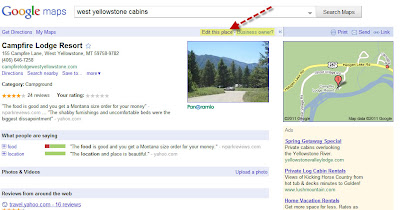
Click on image for full view
If you are the business owner or an authorized person for the company click on "Edit this place". This will take you to page where you can update the business details.

Step #1: Add the basic business details...
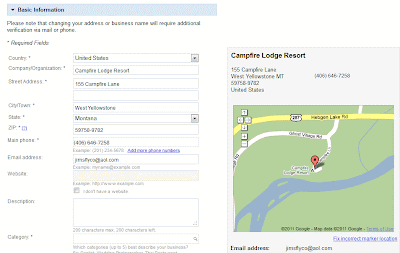
Click image for full view
Be especially careful when adding the business categories. You are allowed to add up to 5 categories. Categories should represent your major product groups you sell, or services you offer. This would be similar to what you would list you business under in the Yellow Pages. For example: "Carpet and Rug Dealer", "Plumbing Contractor", "Interior Designer", "Hardwood flooring store", or "Commercial builder". Use them wisely, but be sure to use all 5 if you can.

Step #2: Add payment options and upload any digital photos you have.
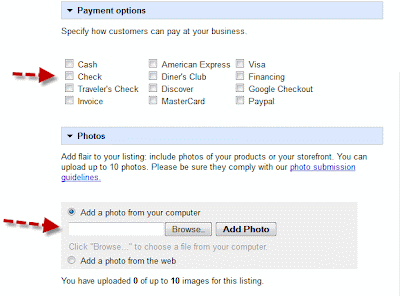
Click image for full view
You can add up to 10 digital photos or images. The images / photos could be of your showroom, products, previous jobs, outside of your business, etc.. Anything that might help entice targeted shoppers to call or visit you business.

Step #3: Enter your service area and business hours
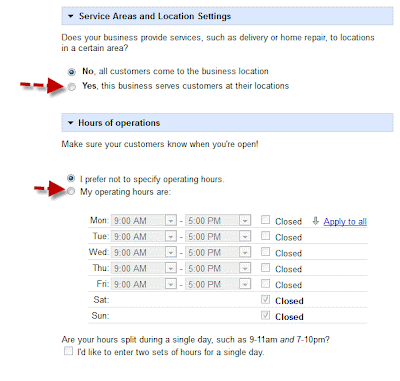
Click image for full view

On an earlier blog post I showed how to map out a service area. See: http://blog.marketingyourstore.com/2011/03/mapping-out-your-service-area-in-google.html

Step #4:  Add any YouTube videos and additional details
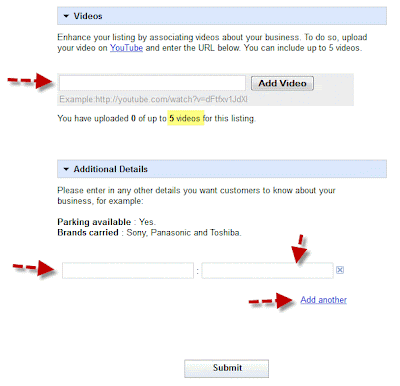
Click image for full view
If you have any Youtube.com videos for your business you can link them to your Google Places page. We feel that it is such a good idea to add videos we actually help our clients create them for their business. Secondly, you can add additional things about your services, major brands you carry, etc.. Again, this additional information all helps potential customers learn more about your company and hopefully than call you, click on your website link, or stop in your store. When done entering all the information click the Submit button.

Finally, we are getting near the end! Now you must validate your listing with Google either by phone or by postcard mailing to your place of business. If you select Phone, Google will immediately call your business phone number and expect you to answer it. When you do answer it an automated voice will give to a pin number. All the pin numbers I have seen were 5-digit long, like: 49324.

If you select by postcard Google will mail to your place of business a postcard that will contain the pin number. See below...
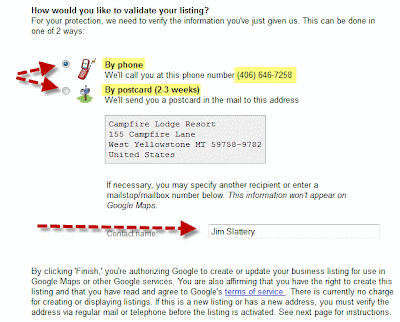
Click image for full view
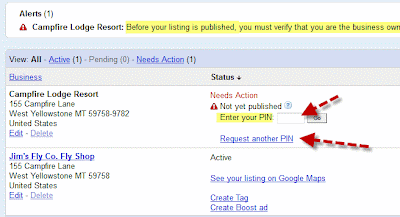
 Last step.. hooray!! If you selected by phone and clicked submit you got the call and at the same time Google will show you  a web page to enter your pin number. Like below...
Click image for full view
Type in the box you pin number and click on the "Go" button. That is it! Your Google Place's business listing page will be reviewed and updated by Google in about 24 hours or so.

If you had selected by postcard you will have to go to Google Places, login and then you will see a similar screen as above. Enter the pin number from the postcard and click on the "Go" button, Again, that is it. You business listing has been claimed and updated.

From now on you can go to Google Places to view visitor traffic, impressions, clicks and to make more updates to your business listings when needed. Just be sure you save you Google Account username, password and  bookmark: http://places.google.com/business

I would love to hear any feedback after you try claiming your Google Places business listing.

Saturday, April 9, 2011

Dissecting Local SMB Listing Opportunities on Google, Yahoo & Bing

I decided this morning to dissect local search results on Google, Yahoo and Bing using the search term: "plumbers West Bend, WI”. I choose “plumbers” + “a local city” + “state code” which I knew all 3 search engines would assume the phrase to be service and location in nature, thus showing at least some local results along with other results. Also, I knew this city, which is not far from me, has more than 10 plumbers. I also figured there would be plumbers listed that didn’t even have a website as well as others who do. My assumption was correct; of the 10 plumbers listed in the local search engine listings only 5 or 6 have websites (about 50%).

I only looked at page #1 search results on Google Local, Yahoo Local and Bing Local.  I also compared Google Everything, Yahoo All and Bing Web results. The idea was to analyze the search engine real estate and local listing opportunities between the 3 search engines, as well as to compare some of their similarities and differences.

I began with the same search term on each and did screen captures so I could more accurately view and analyze the listings. Then I grouped and compiled the listings into a spreadsheet to help visualize the results and where the best listing opportunities were for local plumbers.
Click on image to view full size
First thing to point out is that businesses without websites seem to appear in the local search results as much as businesses with a website. In some cases the plumber may have a website that is not listed or claimed yet. That should not be a real surprise, since so many websites are poorly optimized and many local businesses have not unclaimed their listings. Oddly, Google Local had one plumber listed with their website’s title tag instead of their actual business name and the title did not include the word plumber or plumbing. Bing Local listed one plumber twice with slightly different business names but the address, phone and website URL were identical.

It is surprising to me to see Bing Local still allowing the 3 Sponsored Ads at the top and bottom of the page to be controlled by the YellowPages.com, not by Bing themselves. That is why I decided to put “0” for Bing Local for Ads Top and Ads Bottom. Even when you click on “Advertise Here” in Bing Local search results it takes you to AT&T’s YellowPages.com website.


I find that Google Local gives the best opportunity to promote your business. It is possible to have both a free local listing and a sponsored (PPC) listing appear together in the search results page, thus doubling your exposure on the page. Plus, Google includes 3 organic listngs at the bototm of the page results. Even a plumber from another city that wanted to appear in the PPC page #1 results for "plumbers West Bend, WI" have 5 more sponsored listings chances with Google Local than Yahoo Local and 8 more chances than Bing Local.

Click on the image to see the full size screen shot

 
In the regular search results Google again wins with 28 total listings which includes their 7-pack local listings. With Google Everywhere  results it's possible to appear in the 7-pack local listings, sponsored listings (PPC) and organic listings – although rare it can be done.

Comparing the organic listings for the three search engines (not using local), Yahoo included 7 YP-type directories (Yellowpages.com, SuperPages.com, YellowBook.com, etc.) and only 1 actual plumber’s website. Bing Web had almost the same results with 6 YP-type directories and 1 actual local plumber. Google Everything listed 4 local plumbers in their organic listings and 4 YP-type directories, along with the 7-Pack Google Places listings. (Note: one plumber’s website in the Google’s organic listings wasn't from West Bend but was optimized for West Bend Plumber.)

Of the 7 local plumbers listed in the Google's lucky 7-pack only 1 had claimed their Google Places listing and only 5 of the 7 even have a website. Obviously distance, actual names, others citations, etc. also are a factor in being one of the seven local listings.
Click the image for orginal image screen shot
Click image for full view

Of the 5 local listings on Yahoo it appears only 1 had claim their local business listing and 3 had websites listed. Plus, on Yahoo's left meny they include links to 3 YP-type directories (YellowBook.com, DexKnows.com and SuperPages.com).
Click image for to see original screen shot
Google gives a SMB more listing opportunities (free and paid). They also are known to have the highest, total monthly search engine traffic volume as well. This doesn’t mean you go at this blindly and put everything on Google. You still need to use some smarts and continually measure your results to see where you get the most bang for your buck and the greatest amount of sales leads.

Getting listed on page #1 in all six of these search engine listing scenarios would be a great marketing goal for 2011 for any SMB. In the above example only one plumber acheived this without sponsored listings but also had some sponsored listings as well. Then make another goal to make sure your listings are claimed and up-to-date within all the major YP-type directories to add more opportunities to connect with your targeted local audience. Lastly, consider including in your marketing strategy doing some sponsored (PPC) advertising to boost your listings in cities within your service area that you business is not actually located in. Doing all of the above mentioned should dramatically improve your local search visibility to your targeted audience. Good luck!

Last note: If you perform the same search using the same search term you results may be slightly different depending on your location, foot print and other factors.